An enquiry lands in your inbox at 4:47pm on a Friday. It is a good one. You see it Monday at nine.
By then the prospect has emailed two competitors, and one of them replied in four minutes. You never find out you lost, because nobody tells you. The deal just never happens.
That gap — between when something needs doing and when a human gets to it — is the thing AI automation for small businesses is actually for. And almost nobody is using it that way yet.
In the 2026 Small Business AI Outlook Report from business.com and Dialog, a survey of 1,009 US employees at companies with fewer than 250 people, 84% said they had used an AI chatbot in the past year. Only 19% had used a workflow automation tool.
That 65-point gap is the whole opportunity. Typing prompts into ChatGPT is a habit — it saves an hour here and there and stops the moment you stop typing. Automation is a system that runs at 4:47pm on a Friday whether or not anyone is watching. One compounds. The other does not.
Here is what AI automation for small businesses actually looks like in practice, what it costs, and the order to build it in.
What is AI automation for small businesses?
AI automation for small businesses is software that carries a repeatable business task from start to finish without a person driving it, using an AI model to handle the judgment steps in the middle — reading a message, working out what it means, deciding what happens next. It differs from using ChatGPT, which still needs a human at the keyboard, and from traditional automation, which can only follow fixed rules it was given in advance.
Most articles blur three different things together. Keeping them separate is the difference between a tool subscription and a growth lever.
Using AI is a person prompting a model. You ask it to draft an email, it drafts the email, you send it. Real value, capped entirely by how often you remember to do it.
Traditional automation is a rule that fires without a person. Form submitted, contact added to CRM. Reliable, but brittle — it does exactly what you specified and falls over on anything unexpected.
AI automation is a rule that fires without a person and exercises judgment in the middle. Form submitted: read the message, work out what they actually want, score them against your ideal customer profile, draft a reply in your voice, then either send it or escalate to a human depending on how confident it is.
Only the third one changes your economics. It absorbs the messy, judgment-heavy middle of a process — the part that used to require a person, and therefore used to cap how many customers you could serve.
Where AI workflow automation fits
AI workflow automation for small business is the same idea applied end to end rather than task by task: trigger, enrichment, judgment, action, handoff, all running as one chain. The distinction is not academic. Tools price it that way, and a chain that silently stops halfway is worse than no automation at all, because you stop checking it.
Where AI automation for small businesses actually stands
The headline adoption numbers look enormous. business.com puts AI investment among US small businesses at 57%, up from 36% in 2023. A LinkedIn study covered by the US Chamber of Commerce found 57% expect AI to improve their daily working lives, with the shift from experimentation to adoption framed as the next step.
Then you look at what people are actually using, and the picture falls apart.
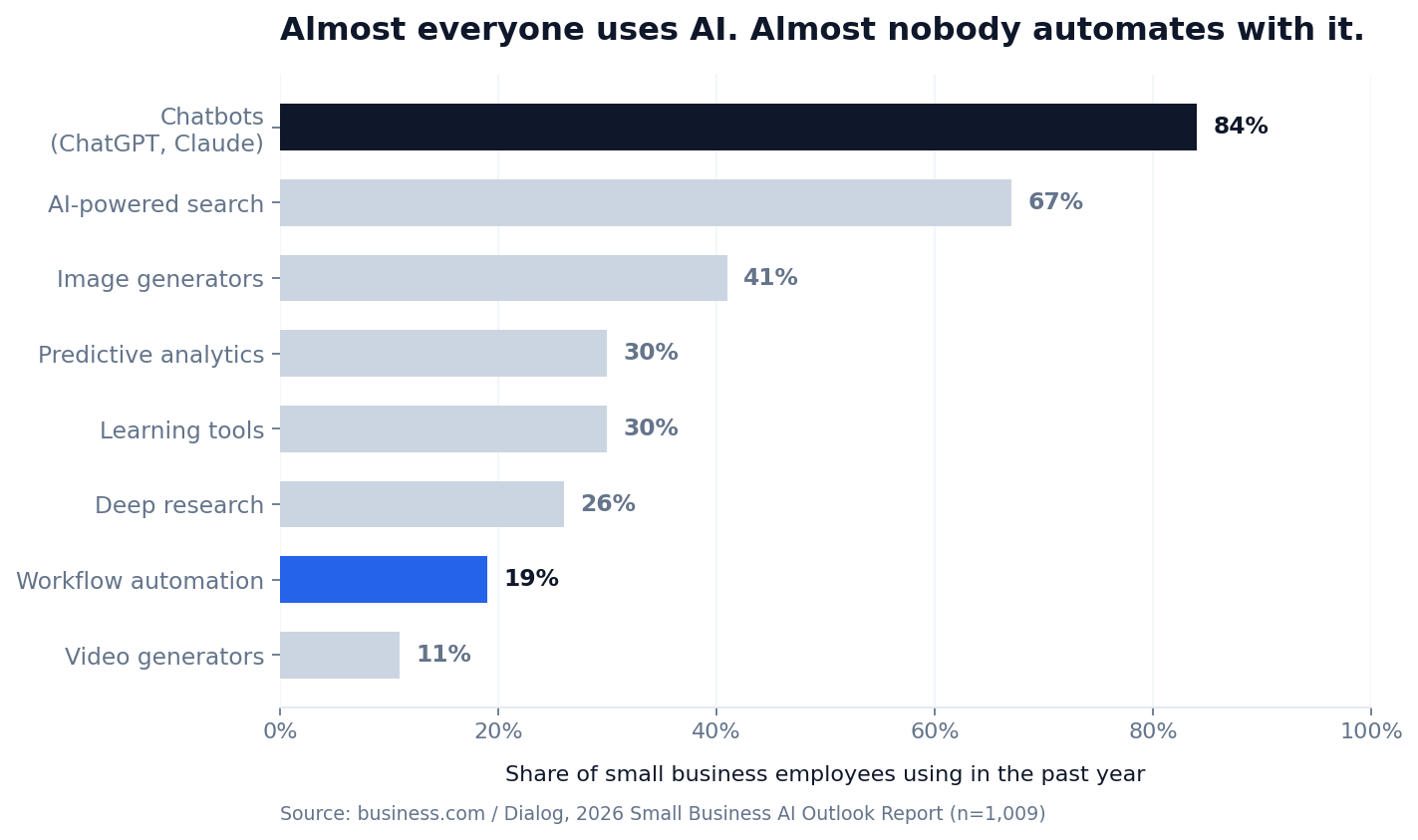
Chatbots at 84%. AI-powered search at 67%. Image generators at 41%. Then a cliff down to workflow automation at 19%.
Read that as a market signal rather than a statistic. Small businesses adopted every part of AI that required no decisions, and skipped every part that required deciding how the business runs. The second category is where the compounding lives.
The gap gets wider the smaller you are.
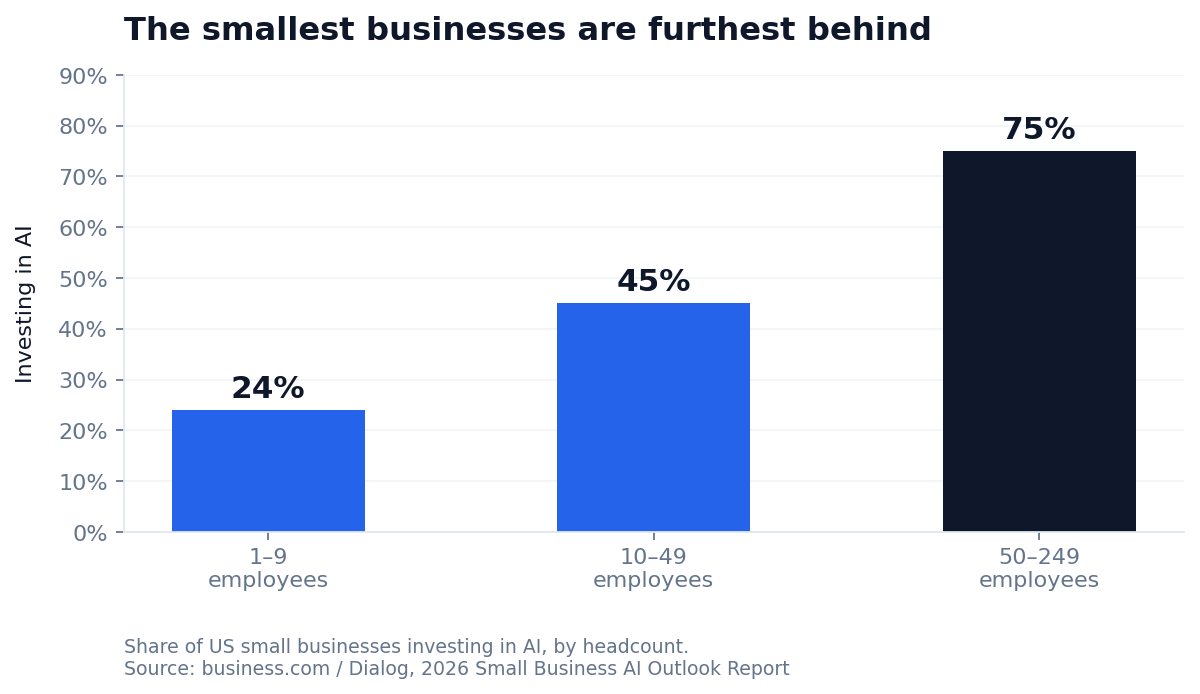
One to nine employees: 24% investing. Fifty to 249: 75%. The companies with the least slack in the week — the ones for whom five reclaimed hours would change something — are the least likely to have gone looking for them. Which is precisely why AI automation for small businesses at the smallest end is still an edge rather than table stakes.
The five AI automations with the fastest payback
The best AI automation for small businesses is rarely the most sophisticated one. The workflows worth building first share three traits: the task happens often, it follows a recognisable pattern, and a mistake is cheap to fix.
1. Lead response and speed-to-lead
Back to Friday at 4:47pm. An enquiry arrives. AI reads it, pulls the company’s details from public sources, scores it against your ideal customer profile, drafts a reply that references what they actually asked about, and either books the call or hands a qualified brief to a human for Monday.
Response time goes from three days to three minutes. For most small businesses this is the single highest-leverage number in the funnel, and the fastest available fix for a B2B lead generation programme that produces enquiries but not meetings.
2. Customer enquiry triage
Not chatbot deflection — triage. AI reads every inbound message, sorts it, pulls the relevant account history, and drafts a reply for a human to approve or rewrite. You keep the judgment and delete the reading, sorting and typing.
This is the version customers do not resent, because there is still a person on the other end. They just get to you faster.
3. Content repurposing
One long-form asset becomes a newsletter, five social posts and a sales follow-up sequence, generated the moment you publish and queued for review. Marketing is one of the two areas where small businesses have adopted AI most (62%, level with customer service) — but most of that work is still done by hand, one piece at a time.
4. Proposal and quote assembly
AI pulls requirements out of the discovery call transcript, matches them to your service catalogue, assembles a draft from your templates, and flags anything needing a pricing decision. A two-hour job becomes fifteen minutes of review.
5. Reporting and pipeline hygiene
Ad platforms, CRM and analytics get pulled into one weekly summary that says what changed and what needs attention, in plain English. Meanwhile stale records get flagged, duplicates merged, missing fields enriched.
Deeply unglamorous. Also the reason most small business CRMs quietly become unusable within eighteen months.
| Automation | Typical setup time | What it replaces |
|---|---|---|
| Lead response & scoring | 1–2 weeks | 2–5 hrs/week of manual follow-up |
| Enquiry triage | 1 week | 3–8 hrs/week of inbox sorting |
| Content repurposing | 3–5 days | 4–6 hrs/week of reformatting |
| Proposal assembly | 1–2 weeks | 1.5 hrs per proposal |
| Reporting & CRM hygiene | 1 week | 2–4 hrs/week of spreadsheet work |
Ten more worth knowing about
Those five carry the most weight, but they are not the whole menu. These come up constantly and are cheap to build once the first workflow has taught you the pattern.
| Automation | What it does |
|---|---|
| Meeting notes and follow-ups | Transcribes the call, extracts actions, drafts the recap email |
| Invoice chasing | Flags overdue accounts and drafts escalating reminders |
| Review requests | Fires after delivery, personalises the ask, routes unhappy replies internally |
| Applicant screening | Summarises CVs against your criteria and shortlists for a human |
| Reorder and stock alerts | Watches stock levels against supplier lead times, drafts the order |
| Appointment reminders | Confirms, reminds, and handles the reschedule conversation |
| Competitor monitoring | Tracks rival pricing and site changes, summarises weekly |
| Expense categorisation | Reads receipts, codes them, flags anything unusual |
| Social media engagement | Surfaces brand mentions worth answering and drafts the reply |
| Client onboarding | Triggers the right documents, credentials and check-ins per client type |
What AI automation for small businesses actually costs
This is where most guides go quiet. Real numbers for AI automation for small businesses, based on typical list pricing in 2026 — check current vendor pages, because this category reprices constantly.
| Layer | Examples | Typical monthly cost |
|---|---|---|
| Automation platform | Zapier, Make, n8n | $20–$100 |
| AI model access | OpenAI, Anthropic, Google APIs | $20–$150 depending on volume |
| CRM or system of record | HubSpot, Pipedrive, Zoho | $0–$100 per seat |
| Supporting tools | Transcription, enrichment, scheduling | $30–$80 |
A working starter stack runs roughly $100–$250 a month. A mature multi-workflow setup for a team of ten lands nearer $400–$800. So the software is not the expensive part — the build is. One workflow takes a competent person somewhere between a few days and two weeks, or $1,500–$6,000 outsourced.
One pricing detail that catches people out. Zapier bills per task, meaning every individual action inside a workflow. Make and n8n bill per execution, where an entire multi-step workflow counts as one. For a five-step automation running a thousand times a month, that is a fivefold difference on the same invoice.
How to tell if an automation is worth building
Every case for AI automation for small businesses comes down to one line of arithmetic. Run it before you build anything:
(Hours saved per month × your loaded hourly cost) − monthly tool cost = monthly return
Divide the build cost by that number for your payback period in months. Over six months, deprioritise. Under two, build it this week.
Worked example. Enquiry triage saves your office manager six hours a week, so 26 hours a month. At a loaded cost of $35 an hour, that is $910 of recovered capacity. Tools cost $120, so net return is $790 a month. If the build cost $2,500, payback lands at 3.2 months.
Two honest caveats. Recovered hours are only worth money if they get redeployed into work that generates revenue — otherwise you have bought slack, not growth. And expect reality to land below the projection.
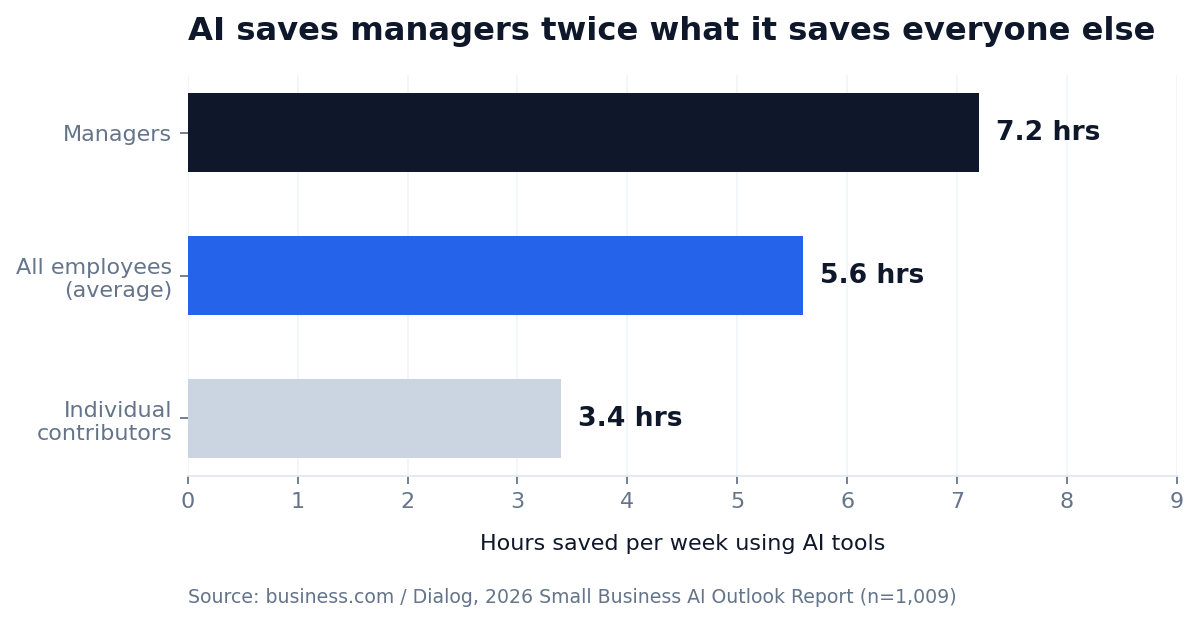
The survey puts average time saved at 5.6 hours a week, but managers report 7.2 and individual contributors 3.4. When you model the return on AI automation for small businesses, use the lower number and let yourself be pleasantly surprised.
What you should not automate
AI automation for small businesses works best when it has clear edges. Three categories to leave alone, at least at first.
Anything where being wrong is expensive. Pricing calls, contract terms, refund approvals, hiring decisions. AI can prepare these. It should not make them.
Your highest-value relationships. Your top ten accounts should feel a human on the other end. Automate the admin surrounding those relationships and never the relationship itself.
Processes that are already broken. Automating a bad process gets you the same bad outcome, faster and at scale. Fix it on paper first. This is the most common and most expensive mistake in the category, and no amount of clever tooling saves you from it.
There is a reputational dimension too, and your team is usually right about it: 45% of small business workers worry that too much AI could damage their company’s standing with customers, and 39% question whether their business needs as much of it as the industry insists.
Why most small business AI projects stall
Most AI automation for small businesses fails for reasons that have nothing to do with the technology. Three patterns account for almost all of it.
They automate tasks instead of workflows. Ten disconnected automations give you ten new things to maintain. One end-to-end workflow — enquiry to qualified meeting — changes an outcome you can point at.
Nobody owns it. Automations drift. APIs change, forms get new fields, prompts stop matching reality. Without a named owner reviewing the output monthly, most builds quietly rot inside a quarter.
Nothing was measured beforehand. If you never recorded how long the task took, you cannot prove the automation worked — and next year it loses the budget argument to something that can.
A 90-day rollout plan
| Phase | Focus | Outcome |
|---|---|---|
| Days 1–30 | Audit and instrument. Log where the hours actually go for two weeks. Pick one workflow. Document it manually, end to end. | A baseline you can measure against, and one clear target. |
| Days 31–60 | Build and pilot that single workflow, with a human approving every output before it leaves the building. | An automation you trust, with error rates you have observed rather than assumed. |
| Days 61–90 | Drop the approval step where confidence is high. Add the second workflow. Assign an owner and a monthly review. | A system that runs without you, and a repeatable pattern for the next one. |
Resist compressing this. The businesses that get durable results from AI automation for small businesses are the ones the survey calls careful evaluators — 54% of small business leaders, experimenting selectively and measuring before they expand. Only 30% call themselves early adopters, and the wreckage tends to collect in that group.
Frequently asked questions
Is AI marketing automation affordable for small businesses?
Yes, at the low end. A working marketing automation stack — automation platform, model access and a scheduling tool — starts around $100 a month. The real cost is the build: typically $1,500–$6,000 per workflow outsourced, or a week or two of internal time. Start with one workflow and fund the second out of what the first returns.
How do AI sales automation tools help small businesses increase revenue?
Through consistency rather than cleverness. AI sales automation for small business works on three fronts: cutting response time on new enquiries from hours to minutes, scoring and routing leads so your best prospects reach a human first, and running follow-up sequences that do not quietly stop after the second email. Most small businesses lose more revenue to slow and inconsistent follow-up than to weak pitching.
How do AI agents automate customer service for small businesses?
The reliable pattern is triage, not replacement. AI reads incoming messages, classifies intent, retrieves the relevant account context and drafts a response. Simple high-confidence cases resolve automatically; everything else reaches a human with the research already done. Full autonomous deflection is where satisfaction scores usually start falling.
How can AI automate marketing for a small business?
The highest-return applications are content repurposing, lead scoring and routing, follow-up sequences personalised from CRM data, and automated performance reporting. Marketing is already one of the two most-adopted AI areas among small businesses at 62% — the gap is that most of that work is still manual rather than automated.
What are the best AI tools for small business automation?
The orchestration layer matters more than the model. Zapier is easiest to start with and has the widest app coverage. Make handles branching, multi-step logic better and costs less per run. n8n is cheapest at volume and self-hostable, but expects more technical comfort. Pair whichever you choose with a model API and the CRM you already have.
How does AI help small businesses automate tasks?
By taking over the read-sort-decide-draft loop that sits inside most admin work. A person still sets the rules and reviews the edge cases, but the reading, classifying and first-draft writing happen without them. That is why the savings concentrate in roles heavy on coordination rather than execution.
How does AI automate social media engagement for small businesses?
The dependable version is monitoring plus drafting, not autonomous posting. AI watches for brand mentions, comments and relevant conversations, decides which are worth a response, and drafts a reply in your voice for approval. Fully automated posting is where small accounts tend to sound generic and lose the thing that made them worth following.
How long before AI automation shows results?
A single well-chosen workflow shows measurable time savings within 30 days of going live. Revenue effects take longer — usually one to two sales cycles — because they come from faster response times and steadier follow-up rather than from the automation itself.
Where to start
Pick the one process you would be embarrassed to show a client. It is almost always the highest-value thing to automate, precisely because it is the one you have been avoiding.
Time it for two weeks. Run the payback arithmetic. Build it once, properly, with a human in the loop. Then do the next one. That is the whole method — AI automation for small businesses is far less about tooling than about picking the right thing and measuring it.
That 19% figure is the entire point of this article. The automation layer is still wide open, and the businesses that build it this year will spend the next one competing against companies still typing prompts by hand at 4:47pm on a Friday.
If you would rather not build it yourself, book a strategy call and we will map the two workflows in your business with the shortest payback.