An enquiry that lands in your inbox at 4:47pm on a Friday and gets read on Monday is a problem, but a survivable one. Email is the forgiving version. The phone is the unforgiving one.
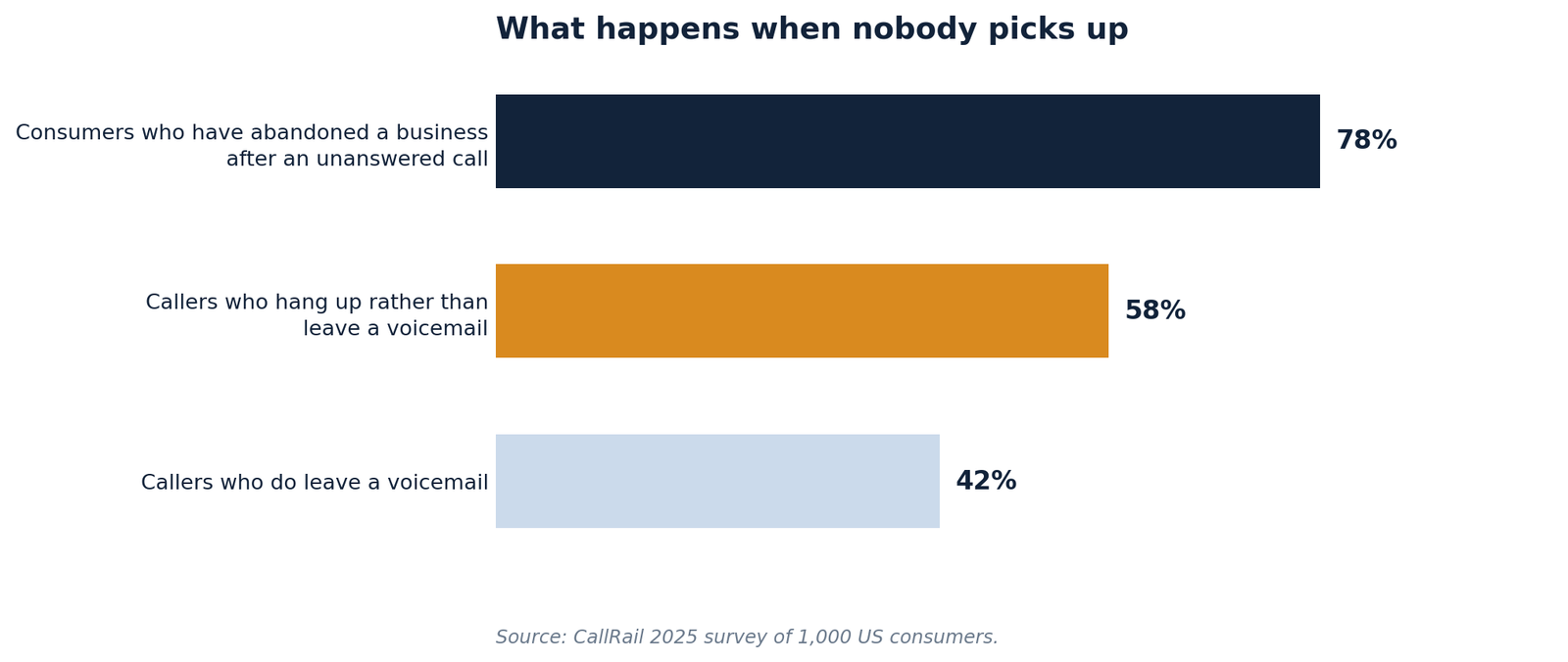
A call at 7:12pm does not sit in a queue waiting to be read. It rings out, and in the four seconds before the caller hangs up they decide whether you are the kind of business that answers. CallRail’s 2025 survey of 1,000 US consumers found 78% have abandoned a business over an unanswered call, and only 42% leave a voicemail when they get one.
An AI receptionist is the automation layer for that channel, and the hardest kind of automation to build well — because unlike an email workflow it has no time to think. Everything has to happen inside roughly 800 milliseconds or the illusion collapses and the caller starts talking over it.
Here is the technical version: what the pipeline looks like, where the milliseconds go, what breaks in production, what it costs per minute, and the compliance work most vendors leave out of the demo.
What an AI receptionist actually is
An AI receptionist is a voice agent that answers your inbound phone calls autonomously — it converts the caller’s speech to text, uses a language model to work out intent, calls your calendar and CRM to get real answers, and speaks a reply back in a synthesised voice, all in under a second per turn. Unlike an auto attendant it is not reading from a menu tree, and unlike a human answering service it costs the same at 3am as it does at 3pm.
Three things get bundled under the same name, and separating them saves a lot of wasted money.
An auto attendant or automated receptionist is a decision tree. “Press 1 for sales.” It cannot handle anything it was not explicitly given, and callers hate it because they know it cannot.
A human answering service is a person in a call centre reading your script. Excellent at judgment, expensive at volume, and your brand experience is set by whoever picked up.
An AI receptionist — also sold as AI receptionist software, an AI virtual receptionist, an AI phone receptionist or an AI answering service — sits between them. It handles open-ended speech like a person, runs at software cost like an IVR, and behaves identically on the four hundredth call of the week as on the first.
Only the third changes your unit economics on the phone channel, and only the third is genuinely difficult to build. Which is why so many demos sound flawless and so many deployments quietly get switched off in month three.
How does an AI receptionist work?
Almost every production AI receptionist in 2026 runs a cascaded pipeline: five discrete stages with text handoffs between them, rather than a single end-to-end speech model.
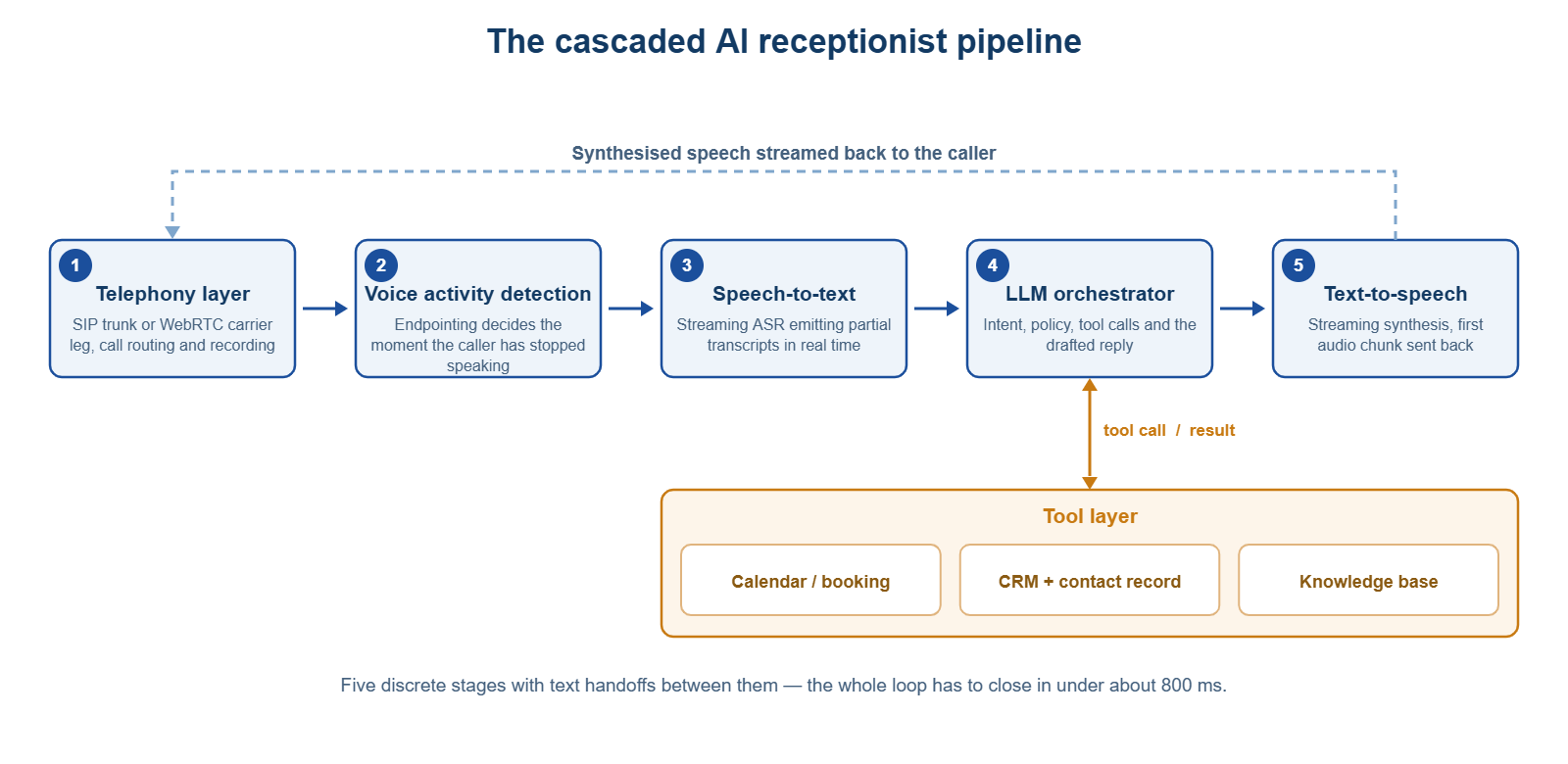
1. Telephony ingress. The call arrives over SIP or PSTN and is bridged into a media server as a real-time audio stream. This layer also owns DTMF capture, call recording, and the transfer leg you will need later.
2. Voice activity detection and endpointing. The system answers one question continuously: has the caller finished, or are they mid-thought? Wrong one way and the agent interrupts; wrong the other and you add half a second of dead air to every turn. This is the most under-engineered stage in the category, and the one that most often makes an otherwise good agent feel robotic.
3. Speech-to-text. Streaming ASR emits partial hypotheses as the caller talks rather than waiting for silence, so downstream stages start early. Confidence scores should be surfaced, not swallowed — they are what your escalation logic runs on.
4. LLM orchestrator. The model classifies intent, tracks state, and issues function calls: checking availability, looking up a customer record, retrieving your pricing policy. Anything the agent asserts as fact should originate from a tool call, never from the model’s own recall.
5. Text-to-speech, with barge-in. Audio streams out chunk by chunk so the first syllable lands fast. The moment the caller speaks over it, playback must stop, the buffer must flush, and the turn must restart. An agent that talks through an interruption reads as a machine within two seconds.
Why not a single speech-to-speech model?
Speech-to-speech models skip the text handoffs and are faster. They are also harder to trust here. Cascaded architectures dominate production in 2026 for two reasons: function-calling reliability holds up better when an agent needs five or more tools with strict schemas, and debugging is tractable. When a cascaded call fails you have a span tree telling you whether ASR confidence collapsed, the prompt misfired, or TTS mangled a surname. When a speech-to-speech call fails, you have audio in and audio out. For a voice AI receptionist booking against a real calendar, take the observable architecture.
The latency budget is the whole product
Human conversation runs on a turn-taking gap of roughly 200 milliseconds. Anything materially slower registers as hesitation, and hesitation is what makes callers repeat themselves, talk over the agent, or ask to speak to a person.
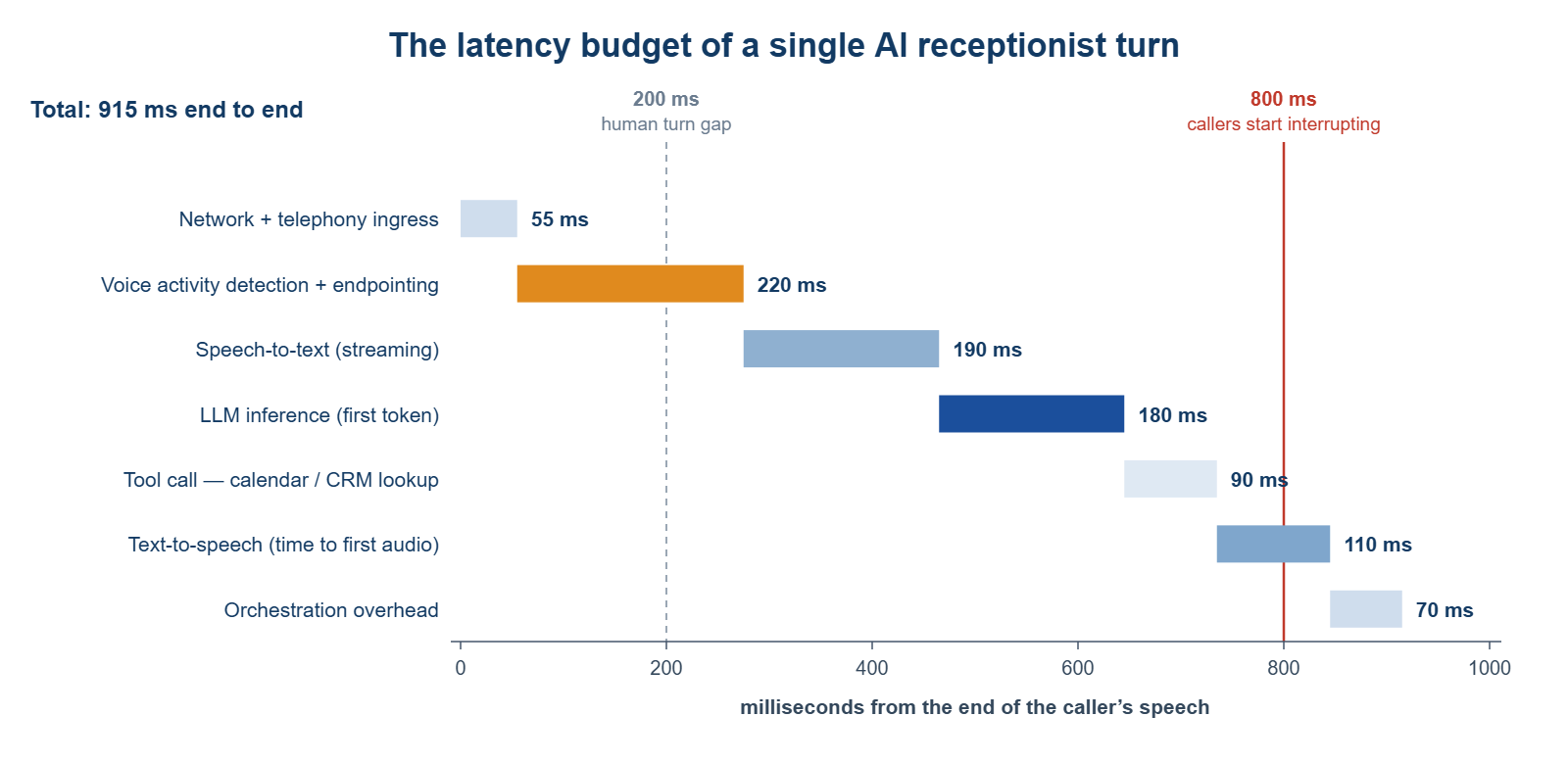
| Stage | Typical budget |
|---|---|
| Network and telephony ingress | 30–80 ms |
| Voice activity detection and endpointing | 150–300 ms |
| Speech-to-text (streaming) | 150–250 ms |
| LLM inference, first token | 100–300 ms |
| Tool call — calendar or CRM lookup | 50–150 ms |
| Text-to-speech, time to first audio | 40–200 ms |
| Orchestration overhead | 50–100 ms |
Sub-700ms end-to-end is the widely accepted target; sub-500ms is achievable with careful component selection. Real deployments land higher — one 2026 benchmark across more than ten live voice agent fleets reported 680 ms at p50 and 1,180 ms at p95.
That p95 is where the arguments happen. Averages hide the calls that go wrong, and a caller needs only two bad turns to decide they are talking to a robot. When you evaluate an AI receptionist vendor, ask for p95 latency on live traffic — not the demo number, and not the average. Worth knowing too: endpointing delay does not appear in most published benchmarks, because vendors measure from end-of-speech rather than from the caller’s last syllable.
What actually breaks in production
The demo call is a native English speaker in a quiet room saying “I’d like to book an appointment.” Your traffic is not that. Four failure modes account for most of the damage.
Endpointing errors on natural pauses. People pause mid-sentence to check a diary or read out a postcode. Fixed silence thresholds cut them off. Semantic endpointing — judging whether the utterance is grammatically complete, not just whether the audio went quiet — is the fix, and it costs latency.
Names, addresses and alphanumerics. Word error rates on conversational speech are workable. On surnames, street names and reference numbers they are not. Any AI receptionist taking a booking needs a confirmation loop that reads the value back verbatim, plus a DTMF keypad fallback for anything the caller has already tried to say twice.
Hallucinated availability. The most expensive failure in this category is an agent that confidently books a slot that does not exist. That is an architecture problem, not a prompting problem: availability must come from a live tool call constrained to a schema, and the model must be unable to answer from memory when the tool fails.
Accents and background noise. Accuracy degrades sharply on accented speech, hands-free calls and noisy sites. If your customers ring from vans and building sites, test on recordings from vans and building sites before you sign anything.
The 24/7 part is an infrastructure problem, not an AI problem
“AI receptionist available 24/7” gets used as a feature. It is really a reliability commitment, and the part vendors are quietest about.
A cascaded pipeline has four external dependencies — telephony carrier, ASR, model, TTS — and your agent is only as available as the least reliable one. At 2am, with nobody watching, a degraded TTS endpoint does not produce an error page. It produces silence on a live call with a customer on the other end.
What a genuine 24/7 AI receptionist deployment needs:
- Dead-air detection with a hard timeout. No audio in three seconds, fail over rather than wait.
- A fallback route that is not the AI. Voicemail with transcription and instant SMS to a human beats a call that dies mid-sentence.
- A secondary provider for at least ASR and TTS, with automatic switchover — not a config change someone has to be awake to make.
- Out-of-hours behaviour defined separately. At 3am there is no human to warm-transfer to, so the agent needs its own escalation path and callback promise.
- Alerting on call outcomes, not uptime. A platform can report 100% uptime while every call in the last hour ended in a hangup at turn two.
Round-the-clock coverage pays best where an unanswered call has an obvious price: trades, clinics, legal intake, property.
Escalation: designing the handoff before the launch
The failure mode that damages a brand is not a wrong answer. It is an agent that will not let the caller reach a person.
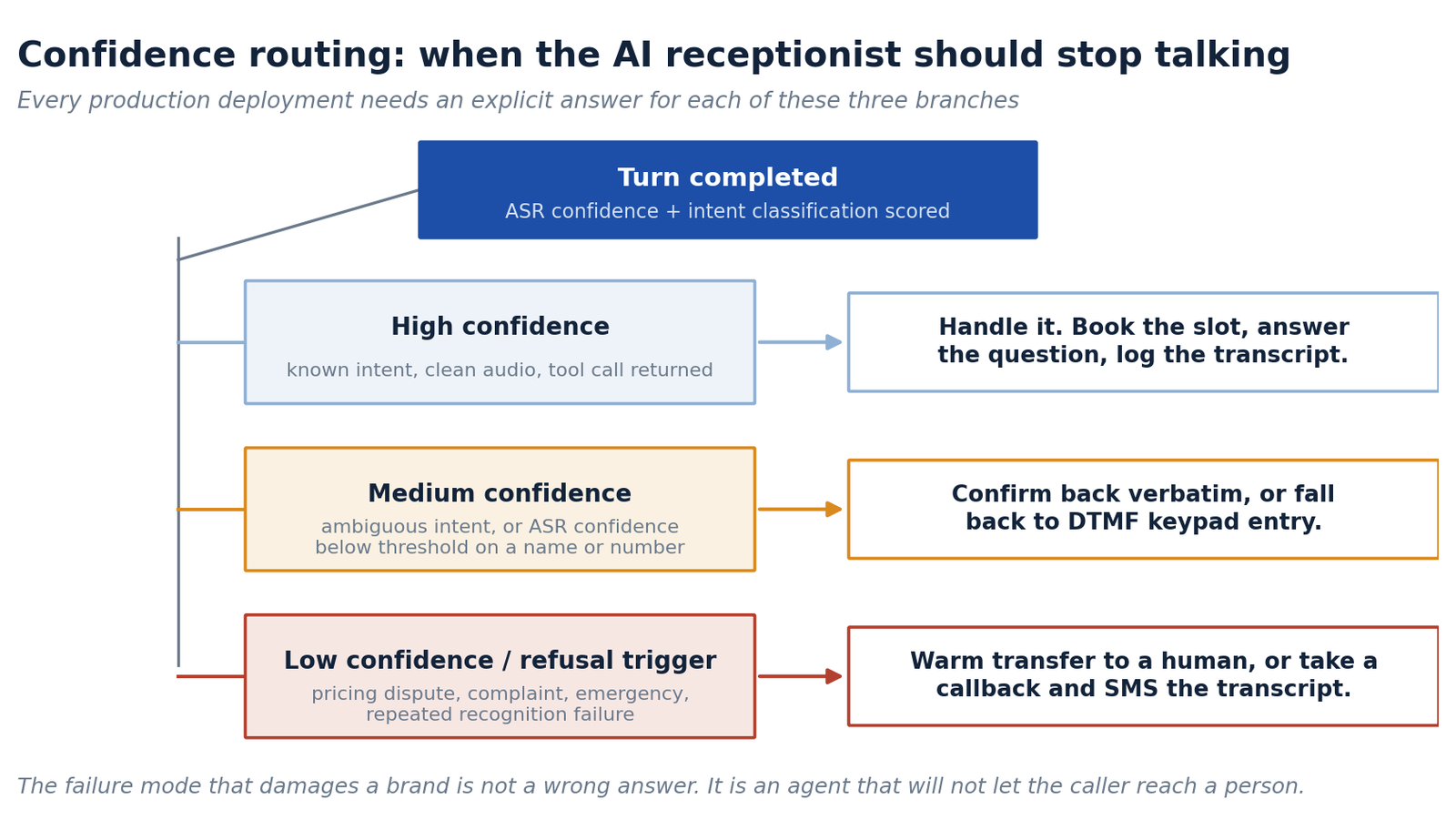
Three rules hold up across deployments. Escalate on the caller’s language, not just model confidence — “let me speak to someone” should be a hard interrupt. Carry context through the transfer, because a human picking up with no transcript is worse than no transfer at all. And log every escalation with its trigger: escalation reasons are the highest-signal dataset you will have.
What an AI receptionist costs
Pricing is quoted per connected minute, and the headline number is usually the platform fee alone.
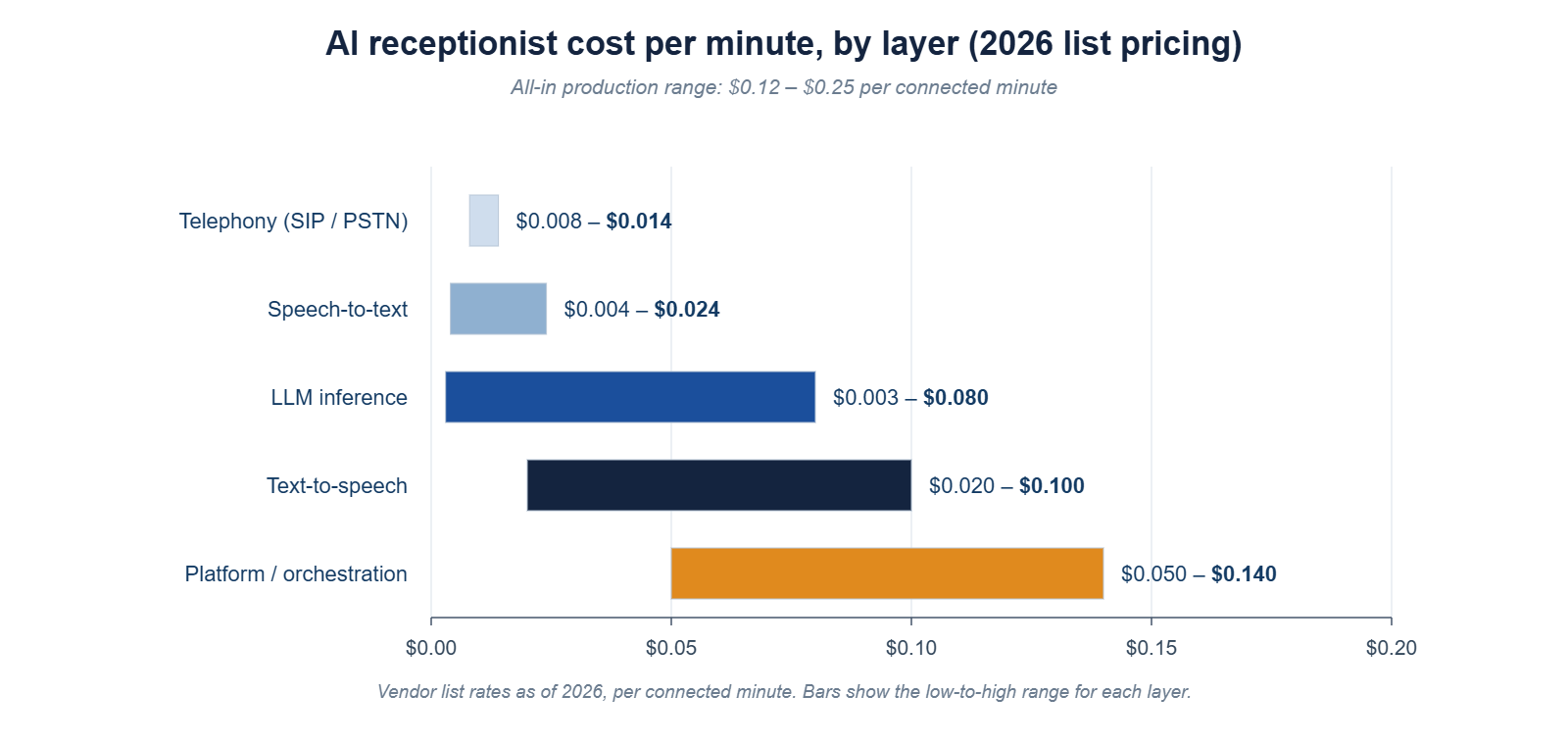
| Layer | Typical cost per minute |
|---|---|
| Telephony (SIP / PSTN) | $0.008–$0.014 |
| Speech-to-text | $0.004–$0.024 |
| LLM inference | $0.003–$0.080 |
| Text-to-speech | $0.020–$0.100 |
| Platform / orchestration | $0.050–$0.140 |
| All-in production range | $0.12–$0.25 |
Infrastructure platforms advertise from $0.05 a minute, but that assumes you bring your own model, ASR and telephony. Managed platforms with CRM integration land at $0.25–$0.50. Note that TTS is often the largest single line: voice quality is what you are actually paying for, and what callers notice first.
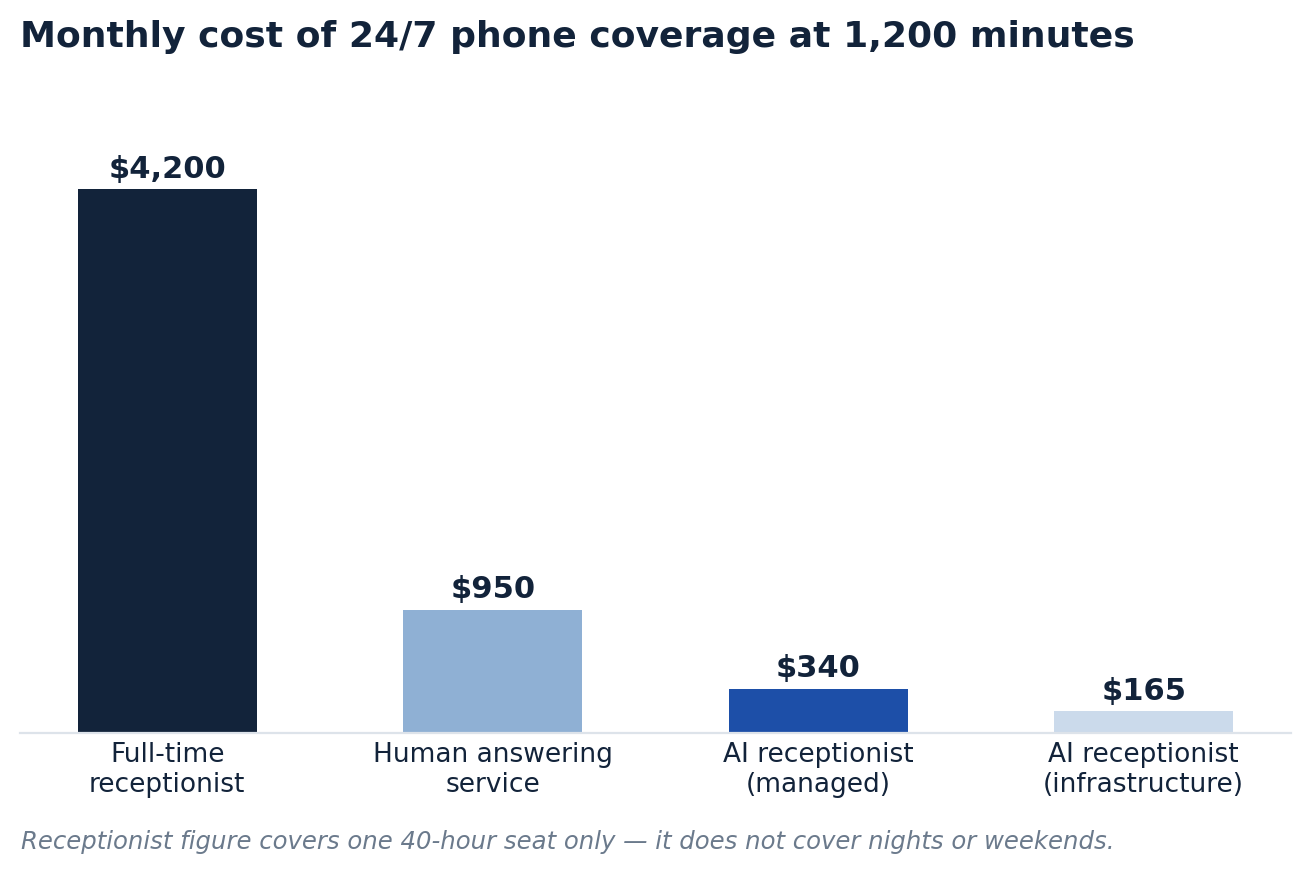
The comparison that matters is not AI versus a receptionist. It is AI versus what you are doing now, which for most small businesses is voicemail. Run the same arithmetic as any other automation:
(Calls recovered per month × close rate × average order value) − monthly run cost = monthly return
A trades business missing 40 calls a month, recovering 30, closing 20% at an average job value of $450, recovers $2,700 against roughly $340 of run cost. Even at half that recovery rate, payback on a $3,000 build lands inside two months.
Two caveats. Recovered calls are only worth money if the capacity exists to serve them. And use a conservative recovery rate — a meaningful share of after-hours callers were never going to buy, and some will hang up on any automated voice regardless of quality.
Compliance you cannot skip
This is where the category gets careless, and it is the part that carries actual liability.
Call recording consent. Twelve US states require all-party consent: California, Connecticut, Delaware, Florida, Illinois, Maryland, Massachusetts, Montana, New Hampshire, Oregon, Pennsylvania and Washington. An AI receptionist records by default. The greeting has to disclose it, before the caller says anything you intend to keep.
AI disclosure. California’s Bolstering Online Transparency Act makes it unlawful to use a bot to mislead someone about its artificial identity commercially, with penalties up to $2,500 per violation — and a safe harbour if you simply disclose. Utah’s AI Policy Act requires disclosure for consumer-facing generative AI in state-licensed professions. The practical answer is the same everywhere: say it in the greeting. Callers who are told they are speaking to an assistant are markedly more forgiving than callers who work it out themselves.
Healthcare and retention. An AI receptionist handling patient calls processes PHI, which means a signed BAA with every vendor in the chain, not just the one you bought from. Separately, decide how long recordings and transcripts live, where, and whether they feed provider model training. Most defaults are not the answer you want.
What not to hand an AI receptionist
The same edges as any other AI automation for small businesses, sharpened because voice is real-time and unrecoverable. Anything where being wrong is expensive: quoting non-standard pricing, agreeing to scope, taking payment details. Emergencies and distress need an immediate route to a person, defined explicitly rather than left to model judgment. And automate the calls from strangers, not the relationships with your best accounts.
Build or buy
| Buy a platform | Build on infrastructure | |
|---|---|---|
| Time to first live call | Days | 4–10 weeks |
| Cost per minute | $0.25–$0.50 | $0.12–$0.25 |
| Custom tool calls | Limited to their integrations | Anything with an API |
| Latency control | Whatever they ship | Yours to optimise |
| Who owns transcripts | Read the contract | You |
| Best for | Standard booking and FAQ flows | Non-standard systems, high volume, regulated data |
The honest default is to buy first. Run it a quarter, read every escalation transcript, and build only once you know which twelve intents carry 90% of your call volume. Building an AI receptionist before you have that data is how teams spend eight weeks optimising a flow nobody uses — the same trap that catches most marketing automation projects.
Frequently asked questions
How do AI receptionists work?
An AI receptionist answers the call, streams the audio through speech-to-text, passes the transcript to a language model that classifies intent and calls your calendar or CRM for real data, then speaks the reply back through text-to-speech. The whole loop runs in roughly 700–900 milliseconds per turn, which is what makes it feel like a conversation rather than a menu.
How much does an AI receptionist cost?
Production deployments run $0.12–$0.25 per connected minute all-in; managed platforms charge $0.25–$0.50. For a small business handling 1,200 minutes a month, expect $150–$400 in run cost, plus $1,500–$6,000 to build if the workflow is customised.
Can an AI receptionist book appointments?
Yes, and it is the highest-return use case — but only when availability comes from a live calendar API call rather than the model’s own recall. Ask any vendor what happens when the calendar API times out. The answer tells you how seriously they take the problem.
Is an AI receptionist better than a human answering service?
Different trade-offs. AI wins on cost, consistency and instant answering at any volume or hour. Humans win on judgment and anything unscripted. The strongest setups are hybrid: AI handles first contact and known intents, then escalates cleanly.
Do I have to tell callers they are speaking to an AI?
In practice, yes. California’s BOT Act makes non-disclosure actionable commercially and offers a safe harbour for disclosing; Utah requires it in licensed professions. Beyond the law, disclosure improves how callers behave — they speak more clearly and complain less.
What is the difference between an AI receptionist and an IVR?
An IVR is a fixed menu tree that only recognises options it was given. An AI receptionist handles open-ended speech, holds context across the whole call, and takes actions in your systems. The caller does not need to know your org chart to get an answer.
How accurate is an AI receptionist at taking names and phone numbers?
Accurate on common names, unreliable on unusual ones — which is why serious deployments read values back for confirmation and offer keypad entry as a fallback. Treat a vendor demo that skips confirmation as a demo, not a product.
Can an AI receptionist really run 24/7?
It can, but the constraint is infrastructure rather than AI. You need dead-air detection, a fallback route when a provider degrades, and a defined after-hours escalation path — because at 3am there is no human to transfer to.
Where to start
Pull your call logs for the last thirty days. Count what percentage rang out, and how many of those never called back. That number is the size of the problem, and for most small businesses it is larger than anything sitting in the B2B lead generation budget.
Then scope narrowly. One AI receptionist handling three intents — hours and location, appointment booking, message-taking with escalation — will outperform an ambitious agent that tries to handle everything and fails unpredictably. Launch with a human reviewing every transcript for a fortnight, and widen scope only where the transcripts say it is safe.
The phone is still where small businesses lose the most revenue to nobody being available, and it is the last channel most of them automate. That order is backwards.
If you would rather not build it yourself, book a strategy call and we will map your call volume, the intents worth automating first, and the payback.